
Your assistant on your phone
Phone AI Friend talks, texts and has its own number. Ask it for a task and it gets it done.
 PROCESSAUTOMATER
Other assistants start from scratch every time.This one learns your task once. Then it does it for you, the way it needs to be done. The more it learns, the more time and money it saves you.
SHOW IT ONCE. DO IT FOREVER.
Show it a task once. Then it does it for you, whenever you need it.
PRESS TO WATCH IT DRIVE THIS SITE.
Sign-in isn't reachable from here right now.
Sign in once so your installs are tied to your profile.
Signed in as
Other assistants start from scratch every time. This one learns your task once. Then it does it for you, the way it needs to be done. The more it learns, the more time and money it saves you.

Do the task in your browser one time. Or just tell your assistant what you need.

It saves each step. You check its first try and say OK.
When you ask, on a schedule, or on its own when something new comes in.
If you can do it on a website, you can show it.

On the day it is due.

Every Monday, ready when you are.

Right away, even at night.

You OK each post first.

It finds a time that works and books it.

Instantly Chef, our sister app, plans your meals and builds your grocery list.
Phone AI Friend talks, texts and has its own number. Ask it for a task and it gets it done.

Turn a picture or a few words into your own animated assistant. Or pick one of ours.







Sign in once so your installs are tied to your profile.
The ProcessAutomater extension captures and plays back tasks and builds workflows in your browser. Works with the desktop app for the full ProcessAutomater experience.
Recommended to pair with the extension for the full feature set.
Your assistant on your phone.
ProcessAutomater runs in your own browser on the sites you choose, and keeps your logins in your own vault. Privacy and Terms.
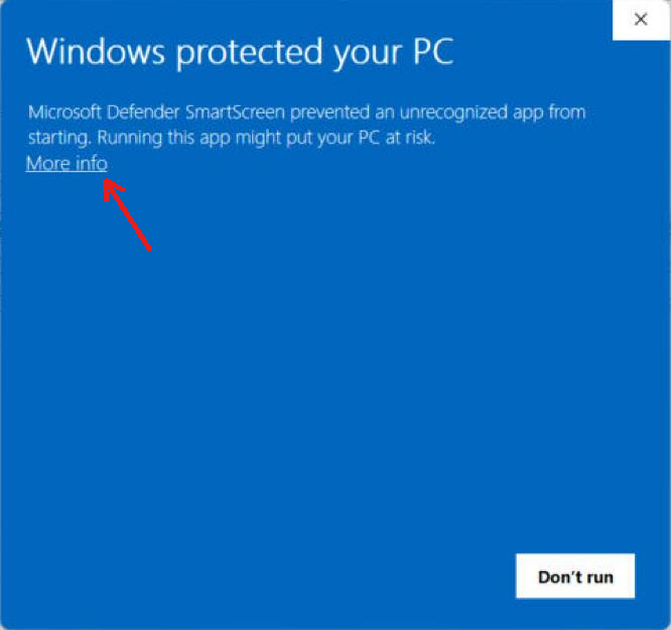
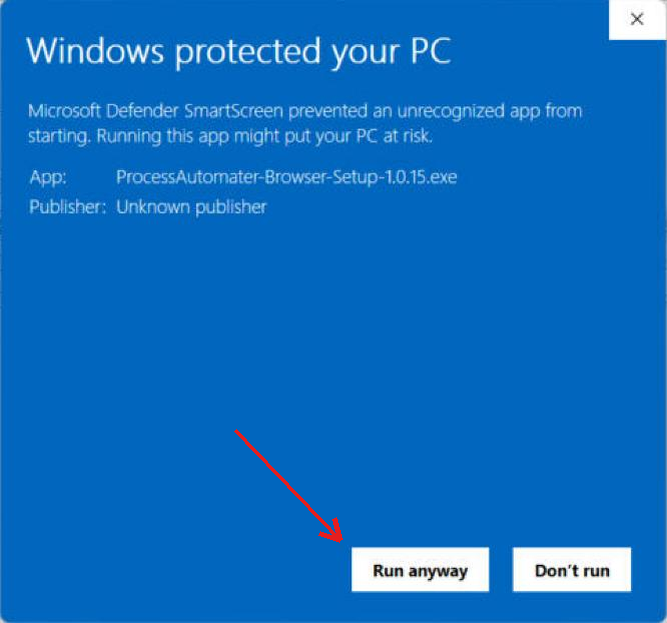
Why: Windows shows this screen for programs it has not seen before. We are completing Microsoft's signing for our installer; once it is signed, Windows learns it from installs like yours and this screen goes away.
Why: Chrome shows this for every extension that is not yet listed in the Web Store. We are preparing our Web Store listing; once we are listed, Chrome installs it like any other extension and this step disappears.
Why: Mac Chrome will install from the Web Store once we are listed there. Until then this is the standard way to load an extension, the same one developers use every day.
Why: macOS shows this for apps Apple has not notarized yet. Our Apple developer enrollment is in progress; once Apple signs and notarizes the Mac app, this step goes away. Same app, same code; the check is about the signature, not the contents.
Free for early access members with code PAEARLY
$29.99 Free